5 things to do before you take your JavaScript app to production
The five things I always check before pressing the big red button: monitoring, deploys and rollbacks, backups, SEO and page speed, and restarts. Each comes with a ready-to-use prompt for your coding agent.
 Szymon Piecuch
The app works on localhost, the demo went great and the launch date is already in the calendar. Ship it? Not so fast! “It works on my machine” and “it’s ready for production” are two very different things – and the gap between them usually shows up at 3 AM, on a Saturday, right after your first big marketing campaign. I’ve been there more times than I’d like to admit. So here’s my personal checklist of 5 things I always go through before pressing the big red button.
One important note before we start: the tools I mention are just examples. Tools come and go, change their pricing and their terms of service. What really matters is the capability behind them. And since it’s 2026 and most of us write code together with AI agents anyway, for every point you’ll find a ready-to-use prompt – just paste it into Claude Code, Cursor or whatever agent you use, and let it do the boring part.
A small piece of advice: read the agent’s plan before you let it touch anything. Production readiness is not the place for “accept all”.
#1 Know it’s broken before your users tell you
There’s nothing more embarrassing than learning about a bug in production from a customer’s email. Or worse – from a tweet. If your users are your monitoring system, you don’t have a monitoring system.
In my opinion, there are four layers you need here:
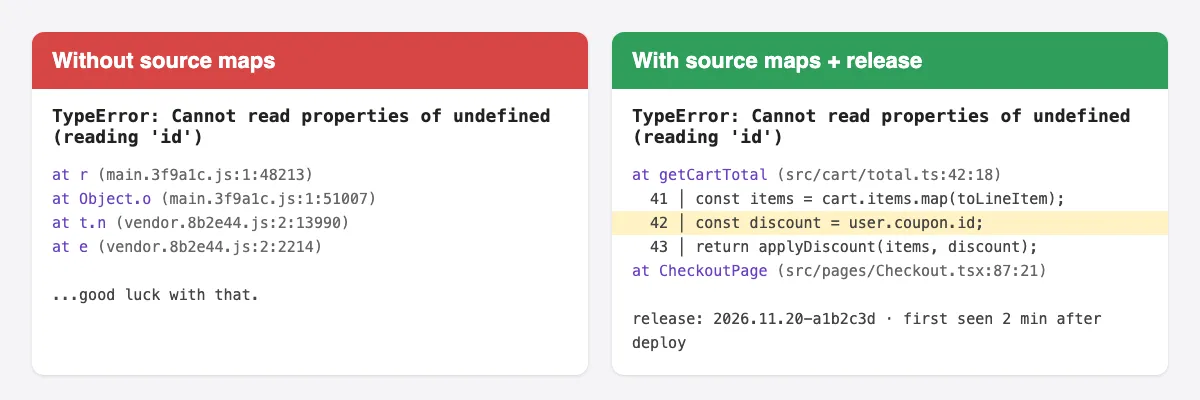
Error tracking. Every unhandled exception, on both front-end and back-end, should land in one place, grouped and with context. I’ve been using Sentry for years and I still recommend it. But here’s the catch – error tracking without source maps is almost useless. A stack trace pointing at main.3f9a.js:1:48213 tells you exactly nothing. Upload source maps during your build and tag every event with a release version, so you know which deploy broke things.
Structured logs. console.log("something went wrong") is not logging. Use a proper logger like pino, log in JSON, use log levels and attach a request ID to every log line. When something goes wrong, you’ll want to follow a single request through the whole system – and you can’t do that by grepping random strings.
Uptime checks from the outside. Your app can’t tell you it’s dead, because… well, it’s dead. Expose a simple /health endpoint and let an external service (UptimeRobot, Better Stack or similar) hit it every minute.
Alerts that reach a human. A dashboard nobody looks at is not monitoring – it’s decoration. Make sure alerts go to a place where someone will actually see them: Slack channel, e-mail, or a phone notification for the really critical stuff. And don’t overdo it – if everything is an alert, nothing is an alert.
Prompt for your agent
I'm preparing my JavaScript/TypeScript application for production and I want
proper error tracking, logging and health checks. Please:

1. Inspect the repository first: detect the framework(s) (e.g. Express, Fastify,
   NestJS, Next.js, React/Vite), the package manager and how the app is built
   and deployed. Summarise what you found before changing anything.
2. Add Sentry (or tell me if another error tracker is already configured and
   extend that instead) for both back-end and front-end:
   - initialise it as early as possible in each entry point,
   - read the DSN and environment name from environment variables,
   - set `release` to the git commit SHA (or the version the CI provides),
   - configure source map upload during the production build and make sure
     source maps are NOT served publicly.
3. Replace ad-hoc console.log calls on the back-end with a structured JSON
   logger (pino, unless another logger is already in use):
   - log level configurable via LOG_LEVEL, defaulting to "info" in production,
   - generate or propagate a request ID (x-request-id header) and include it
     in every log line and in Sentry events,
   - pretty-print only in local development.
4. Add a GET /health endpoint that returns 200 with { status: "ok", version }
   and does not require authentication. Keep it cheap – no heavy DB queries.
5. Add a global handler for unhandledRejection and uncaughtException that logs
   the error, reports it to Sentry and exits the process with code 1.
6. Update .env.example and the README with every new environment variable and
   a short "Monitoring" section explaining where errors and logs go.

Do not change business logic. Show me the plan before making changes, and at
the end list what I still need to do manually (e.g. create the Sentry project,
set up the uptime monitor and alert channels).
#2 Deploy and roll back with one command
Let me guess – your current deployment process is SSH-ing into the server, git pull, npm install, restart and pray? Or maybe you deploy straight from your laptop, with whatever happens to be in your working directory at the moment? I don’t judge, I’ve done that too. But it doesn’t scale and sooner or later it will bite you.
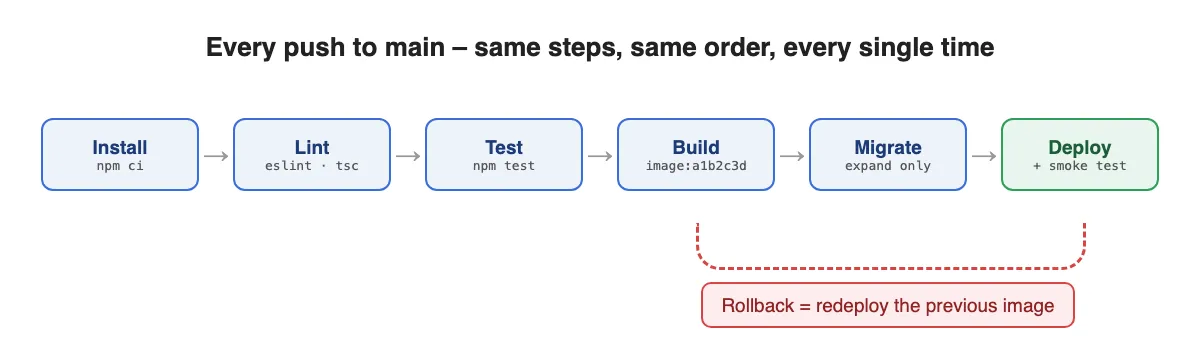
A proper pipeline is not rocket science. Every push to the main branch should go through the same steps:
npm ci– installs exactly what’s in the lockfile, nothing more, nothing less,- lint and type check,
- tests,
- build,
- deploy.
Same steps, same order, every single time. GitHub Actions, GitLab CI, Bitbucket Pipelines – it doesn’t really matter which one you pick. Platforms like Vercel or Render even do most of it for you.
But here’s the part almost everybody forgets: rollback. Deploying is easy, it’s the “oh no, revert it NOW” moment that hurts. Ask yourself honestly – have you ever rolled back your production? If the answer is “no”, you don’t have a rollback, you have a theory. Practise it before you need it, when there’s no stress and no angry customers.
One more thing about databases – make your migrations backwards-compatible. If the new code needs a renamed column, add the new column first, deploy, migrate the data, and remove the old one in a later release (it’s called the expand-and-contract pattern). Otherwise rolling back the code won’t help, because the database has already moved on.
Prompt for your agent
I want a fully automated, repeatable deployment pipeline with a tested
rollback for this JavaScript/TypeScript project. Please:

1. Inspect the repository: detect the package manager, the scripts in
   package.json, the test setup, any existing CI configuration and how the app
   is currently deployed (Dockerfile, Vercel/Netlify/Render config, PM2,
   Kubernetes manifests, etc.). Summarise your findings and ask me which CI
   provider and hosting target to use if it's not obvious.
2. Create a CI workflow that runs on every pull request:
   - install dependencies with the lockfile (npm ci / pnpm install
     --frozen-lockfile / yarn install --immutable),
   - lint, type check, run tests, build,
   - cache dependencies to keep it fast.
3. Create a deploy workflow that runs only on the main branch after CI passes:
   - build an immutable, versioned artifact (e.g. a Docker image tagged with
     the commit SHA) – never rebuild the same version twice,
   - run database migrations as a separate, explicit step before the app
     starts serving traffic,
   - deploy and then run a smoke test against the /health endpoint; fail the
     job if it doesn't return 200.
4. Implement a rollback path that redeploys a previous version with one
   command or one manual workflow run (input: version/commit SHA). Use the
   hosting platform's native rollback if it has one.
5. Review existing database migrations and tell me which ones are NOT
   backwards-compatible with the previous version of the code. Suggest how to
   follow the expand-and-contract pattern for future migrations.
6. Add a "Deployment" section to the README: how to deploy, how to roll back,
   which secrets/variables the pipeline needs.

Don't store credentials in the workflow files – reference CI variables and
tell me which ones I need to create. Show me the plan before writing files.
#3 Backups you’ve actually restored
“Do you have backups?” – “Sure, of course!” – “When did you last restore one?” – awkward silence.
I’ll say it straight: a backup you’ve never restored is just a hope. Maybe the dump is empty. Maybe it’s missing one table because somebody added a new schema. Maybe it takes 9 hours to restore and nobody knew that. You really don’t want to find out any of these during an actual incident.
Here’s what I consider the bare minimum:
- Automated backups. Most managed databases (RDS, Cloud SQL, Supabase, Neon and others) have them built in – just make sure they’re actually turned on and check the retention period.
- Point-in-time recovery. A daily snapshot means you can lose up to 24 hours of data. With PITR you can go back to “5 minutes before someone ran
DELETEwithoutWHERE”. Yes, it happens. Yes, it happened to people way smarter than me. - A copy somewhere else. If your backups live in the same account as your database, then a single mistake (or a single compromised account) takes out both of them. Keep a copy in a different account or region.
- A restore drill. Restore the latest backup to a fresh instance, run a few sanity queries and measure the time. That number is your real recovery time – not the one from the marketing page.
Don’t forget about other stateful things either – uploaded files in S3, for example. Your database will be perfectly restored, pointing to images that no longer exist.
Prompt for your agent
I want to make sure the data of this application can actually be recovered.
Please:

1. Inspect the repository and infrastructure configuration (docker-compose,
   Terraform/Pulumi, ORM config, environment examples) and list every place
   where the application stores state: databases, file/object storage,
   caches that are not purely caches, third-party services holding our data.
2. For each one, tell me how it is backed up today (or that it isn't), based
   on what you can see. Clearly mark what you couldn't verify from the code.
3. For the primary database, create:
   - a backup script (e.g. pg_dump / mysqldump / mongodump in a compressed
     format) that uploads the dump to a separate storage location with a
     timestamped name and a retention policy,
   - a restore script that restores a given backup into a NEW, empty database
     (never the production one), runs a few sanity checks (table list, row
     counts of the most important tables, latest record timestamp) and prints
     how long the whole restore took.
4. If the database is managed (RDS, Cloud SQL, Supabase, Neon, etc.), tell me
   exactly which settings to check for automated backups, point-in-time
   recovery and retention, instead of reinventing them with scripts.
5. Add a scheduled job (CI cron or similar) that runs the restore drill
   against the latest backup at least once a month and fails loudly if it
   doesn't succeed.
6. Write a short RECOVERY.md runbook: how to restore the database to a point
   in time, how to restore uploaded files, and who should do it.

Never run anything against production while doing this. Show me the plan
first and ask before creating any cloud resources.
#4 Get found and load fast – SEO and PageSpeed Insights
You’ve built something great, you launch it and… crickets. Nobody can find it on Google, and the link you shared on LinkedIn shows up as a sad grey box with no image. Sounds familiar?
SEO is often treated as “the marketing team’s thing”, but a big part of it is purely technical – and it’s us, developers, who break it. Let’s go through the basics.
Meta tags and link previews. Every public page needs a unique <title> and meta description. Then add Open Graph and Twitter card tags (og:title, og:description, og:image), so your links look good when shared on social media and in messengers. It’s a small thing, but it makes a huge difference in how many people actually click.
sitemap.xml and robots.txt. Tell search engines what to crawl. And now the classic one: you correctly blocked indexing on staging with noindex… and then the same config went to production. Your shiny new app is invisible to Google and nobody notices for weeks. Always double check this right after the launch.
Client-side rendering pitfalls. If your app is a pure SPA, the HTML that crawlers (and social media bots) get first is basically an empty <div id="root">. Google can render JavaScript, but it’s slower and less reliable, and most link-preview bots don’t render it at all. For public pages – landing page, blog, product pages – consider server-side rendering or static generation (Next.js, Nuxt, Astro, SvelteKit). Keep the SPA for the logged-in part of the app, where SEO doesn’t matter anyway.
Google Search Console. Verify your domain (a DNS TXT record is the easiest way), submit your sitemap and keep an eye on the indexing reports. The URL Inspection tool shows you exactly how Google sees a given page – incredibly useful when something isn’t getting indexed.
PageSpeed Insights. Page speed affects both your rankings and your users’ patience. Put your URL into PageSpeed Insights and you’ll see two kinds of data:
- lab data – a Lighthouse test run on Google’s servers, useful for debugging,
- field data – real measurements from Chrome users (CrUX), which is what actually counts for Google. Brand new sites often don’t have enough traffic for field data yet – don’t panic, it will appear.
The key metrics are Core Web Vitals, and the “good” thresholds are:
| Metric | What it measures | Good |
|---|---|---|
| LCP – Largest Contentful Paint | how fast the main content shows up | ≤ 2.5 s |
| INP – Interaction to Next Paint | how fast the page responds to clicks and taps | ≤ 200 ms |
| CLS – Cumulative Layout Shift | how much the layout jumps around | ≤ 0.1 |
The quick wins are almost always the same: properly sized images in modern formats (WebP/AVIF), lazy loading for images below the fold, explicit width and height on images (hello, CLS!), self-hosted fonts with font-display: swap, and a smaller JavaScript bundle. Check what’s inside your bundle – I promise you’ll be surprised at least once.
To show you how much these quick wins matter, I built a tiny demo landing page and made all the classic mistakes on purpose: a 7.6 MB PNG hero image without dimensions, ~2 seconds of synchronous “analytics + chat widget” JavaScript in the <head>, and a cookie banner injected after the page loads. Then I fixed just three things – resized the image to a 200 KB JPEG with width and height, deferred the script and got rid of the late banner. Here’s what Lighthouse (the same engine PageSpeed Insights uses for its lab data) had to say:
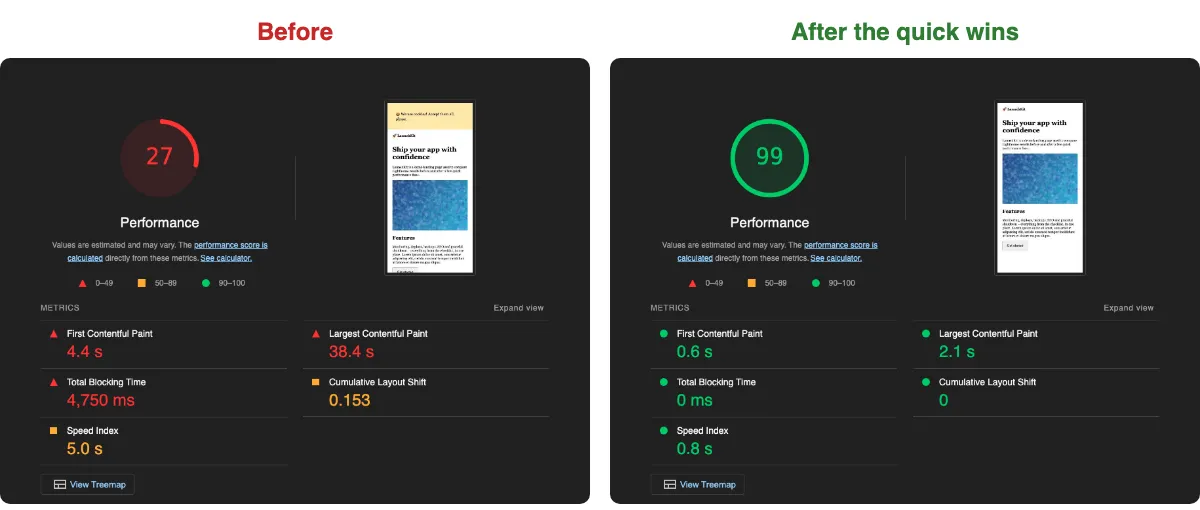
From 27 to 99 with three small fixes. LCP went from 38.4 s to 2.1 s and Total Blocking Time from 4,750 ms to zero. Not bad, huh?
Prompt for your agent
I want this web application to be properly indexable by search engines, look
good when shared on social media and pass Core Web Vitals. Please:

1. Inspect the repository: detect the framework (Next.js, Nuxt, Astro,
   SvelteKit, React/Vite SPA, etc.), the rendering mode of each route
   (SSR/SSG/CSR) and list all PUBLIC pages (not behind login).
2. SEO basics for every public page:
   - a unique <title> and meta description (use the framework's metadata
     API if it has one),
   - canonical URL,
   - Open Graph and Twitter card tags, including og:image (1200x630); if
     the framework supports generated OG images, set that up,
   - a generated sitemap.xml with all public URLs and a robots.txt that
     points to it.
3. Make indexing environment-aware: production must be indexable, every
   other environment must send noindex (meta tag or X-Robots-Tag header) and
   disallow crawling in robots.txt. Add an automated test or CI check that
   fails if the production build contains noindex.
4. If public pages are rendered only on the client, tell me which ones and
   propose the smallest change to render them on the server or at build time.
   Don't migrate the whole app without asking me.
5. Performance:
   - run Lighthouse (or the framework's analyzer) on the main public pages
     and report LCP, CLS, TBT and the top opportunities,
   - fix the quick wins: image sizes and modern formats, explicit width and
     height, lazy loading below the fold, font loading with font-display:
     swap, removing or lazy-loading heavy dependencies,
   - add a bundle analyzer and report the 10 biggest dependencies in the
     client bundle.
6. Add a JSON-LD structured data block where it makes sense (Organization,
   Article, Product, etc.).
7. Write a checklist of manual steps for me: verifying the domain in Google
   Search Console, submitting the sitemap and checking PageSpeed Insights
   field data after launch.

Don't change visible content or copy unless I approve it. Show me the plan
and the Lighthouse results before making changes.
#5 Make the app survive restarts and bad config
This one is my personal favourite, because it’s so often overlooked in Node.js apps. Your app will be restarted – all the time. Every deploy, every autoscaling event, every time the platform decides to move your container somewhere else. The question is whether your users notice.
Graceful shutdown. When your process gets a SIGTERM, by default Node.js just… dies. Every request that was in progress at that moment ends with an error. Instead, you want to stop accepting new connections, let the in-flight requests finish, close the database pool and only then exit. It’s really just a few lines of code:
let isShuttingDown = false;

process.on('SIGTERM', () => {
  isShuttingDown = true; // readiness check starts returning 503
  logger.info('SIGTERM received, shutting down gracefully');

  server.close(async () => {
    await db.end();
    process.exit(0);
  });
  server.closeIdleConnections(); // don't wait for idle keep-alive connections

  // if something hangs, don't wait forever
  setTimeout(() => process.exit(1), 10_000).unref();
});
Liveness vs readiness. Remember the /health endpoint from #1? In a proper setup you actually want two of them. Liveness answers “is the process alive?” – if not, restart it. Readiness answers “can I take traffic right now?” – it returns 503 while the app is starting up, while it’s shutting down or when the database is unreachable. The load balancer stops sending requests, but nobody kills the process. Kubernetes, Docker and most hosting platforms understand this distinction.
Validate your config at startup. My favourite bug: the app starts perfectly fine, everything is green… and 3 hours later the first user tries to reset their password and the app crashes because SMTP_HOST is undefined. Validate every environment variable the moment the app boots and crash immediately if something is missing. Fail fast, fail loud.
import { z } from 'zod';

const Env = z.object({
  NODE_ENV: z.enum(['development', 'test', 'production']),
  PORT: z.coerce.number().default(3000),
  DATABASE_URL: z.string().url(),
  SMTP_HOST: z.string().min(1),
});

export const env = Env.parse(process.env); // throws on boot, not at 3 AM
Timeouts on every outgoing call. One slow third-party API without a timeout can freeze your whole app – requests pile up, memory grows and suddenly everything is down because of someone else’s service. fetch doesn’t time out on its own, but it’s a one-liner: fetch(url, { signal: AbortSignal.timeout(5000) }). Do the same for your database client, HTTP libraries and queues.
Bonus test: run your app locally, send it a bunch of requests and kill it with SIGTERM in the middle. If any request fails, you’ve got some homework to do.
Prompt for your agent
I want this Node.js application to handle restarts, deploys and
misconfiguration without dropping requests or failing late. Please:

1. Inspect the repository: find the server entry point(s), the HTTP framework,
   database/cache/queue clients, background workers and every place where
   process.env is read. Summarise your findings before changing anything.
2. Centralised config validation:
   - create a single config module that validates all environment variables
     at startup with a schema (zod, unless something similar is already
     used), with types, defaults and clear error messages,
   - replace direct process.env reads across the codebase with this module,
   - make the process exit with a readable error listing ALL invalid or
     missing variables if validation fails,
   - update .env.example so it matches the schema exactly.
3. Graceful shutdown:
   - handle SIGTERM and SIGINT,
   - mark the app as not ready, stop accepting new connections, let in-flight
     requests finish, then close database pools, cache/queue connections and
     stop background workers,
   - add a hard timeout (configurable, default 10s) after which the process
     exits with code 1,
   - make sure the process runs as PID 1 correctly in Docker (exec form of
     CMD, or tini) so it actually receives the signal.
4. Health endpoints:
   - GET /health/live – returns 200 if the process is running, no
     dependency checks,
   - GET /health/ready – returns 200 only if the app finished starting, is
     not shutting down and can reach the database; otherwise 503,
   - wire them into the Dockerfile/Kubernetes/platform config if present.
5. Timeouts: find every outgoing HTTP call, database client and third-party
   SDK and make sure each one has an explicit, configurable timeout (e.g.
   AbortSignal.timeout for fetch). List the ones you changed.
6. Add an integration test that starts the server, fires concurrent requests,
   sends SIGTERM in the middle and asserts that every request completed
   successfully.

Keep the changes minimal and don't change business logic. Show me the plan
before you start.
Summary
None of these things are glamorous. Nobody will tweet “wow, their graceful shutdown is amazing!” But they’re the difference between a calm launch and a 3 AM incident with your phone ringing. Here’s the checklist to copy into your next project:
Bonus: if you also want to know who’s visiting your site, take a look at privacy-friendly analytics like Plausible or Umami. Less tracking, and in many cases no giant cookie banner.
And remember – you don’t have to do everything on day one. Pick one point, paste the prompt to your agent and tick the box. Then the next one. Your future self, sleeping peacefully through the night, will thank you!